

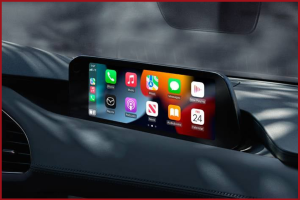
 If you’re a first-time Mazda owner or recently upgraded to a newer Mazda model, one of the exciting features that may have caught your eye is Mazda’s advanced infotainment system. Get to know the wide-ranging features of the Mazda infotainment system, found in Mazda vehicles available at your neighborhood Mazda dealer.
Key Features
Your Mazda’s infotainment system is an advanced hub for accessing and controlling many key features of your vehicle, from making hands-free calls to playing your favorite playlist to setting the brightness of your touchscreen display. With Mazda Connect, you can easily interface with various aspects of your vehicle’s tech capabilities.
Vehicle Information
Through Mazda Connect, you can access real-time monitoring of your vehicle’s major systems (displayed information can vary depending on the model and trim). From this tab, you view the status of:
- Manufacturer notices including recalls and safety bulletins
- Maintenance messages including oil changes and tire service intervals
- Fuel efficiency data
Entertainment
Listen to your favorite station or access your own media content via a USB or Bluetooth connection. Other available entertainment platforms (a subscription may be required) include SiriusXM and Pandora.
Communication
With Mazda Connect, you can use hands-free technology to make calls or use voice commands to control various features, such as sending text messages and accessing the contact list on your smartphone.
Navigation
On equipped Mazda models and trims, the infotainment center also controls your vehicle’s navigation system. It should be noted that an SD card must be inserted for the Mazda navigation system to work properly.
Settings
The infotainment system in your Mazda is also where you’ll find the controls to adjust settings for various functions throughout your vehicle. These include:
- Interior and exterior lighting
- Audio quality, including bass, treble, and balance
- Connectivity, including Bluetooth-enabled device pairing
Controlling Your Infotainment System
Commander Switch
The commander switch is a rotary knob located on the center console between the driver and front passenger seats. Rotating the knob enables you to navigate between the various menus and pressing down on the knob allows you to make your selection, all without having to look down at what your hand is doing.
Touchscreen Display
Another way to access the infotainment system menus and make selections is through the touchscreen display itself. Simply touch the icon and directional icons to navigate your way through the options.
Voice Recognition
On certain models and trims, you can also use voice commands to access certain infotainment system functions to keep your hands on the steering wheel and your eyes on the road.
To learn more about the advanced infotainment systems found in Mazda vehicles, visit the Mazda experts at John Lee Mazda in Panama City, FL.
Connect with us
